

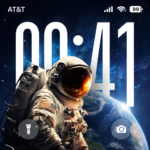
Liquid Lock Screen: KaLock is an app designed to personalize your device’s lock screen. It allows users to transform their phone’s interface with a variety of themes, animated widgets, and a customized notification display. Users can choose from over 30 ready-made themes, including styles like cyberpunk, minimalist, and nature, or create a unique lock screen by using their own photos from the gallery. A distinctive feature is the option to enable a liquid glass effect for the clock, blending it seamlessly with the chosen wallpaper for a refined aesthetic.
Customizing Your Lock Screen Appearance
KaLock provides various ways to personalize your lock screen. You can select from a collection of over 30 pre-designed themes, which cover diverse styles such as kawaii, sport, and girly. Alternatively, the app allows you to create a custom lock screen using your own images; simply choose a photo from your device’s gallery and adjust it to your preference. Beyond themes, you can modify the text color, select a different clock style, or change the date format to suit your taste.
Widgets and Quick Access Tools
The app supports adding up to four widgets to your lock screen, which can be further personalized with fun stickers. For convenience, KaLock also includes app shortcuts directly on the lock screen. This enables users to quickly turn on the flash or open the camera without fully unlocking their device.
Enhancing the Lock Screen Experience
To quickly change your lock screen wallpaper, you can hold down on the KaLock lock screen and swipe left or right. For the custom lock screen to function correctly and consistently, the app requires permission to run in the background.
Accessibility Service Requirement
KaLock utilizes the Android Accessibility Service to deliver its core lock screen functionality and related features. This service is specifically used to display the app’s custom lock screen when your device is locked, provide user-requested controls such as music and volume adjustments, and support other necessary functions for the lock screen experience. It is important to note that the app states it uses the Accessibility Service only for these stated purposes and does not use it to collect, store, sell, or share personal or sensitive user data. To enable the lock screen features, you must activate the service by navigating to your device’s Settings, then Accessibility, then Installed Services, and finally enabling KaLock. This service can be enabled or disabled at any time through your device’s Accessibility settings.




Write a review